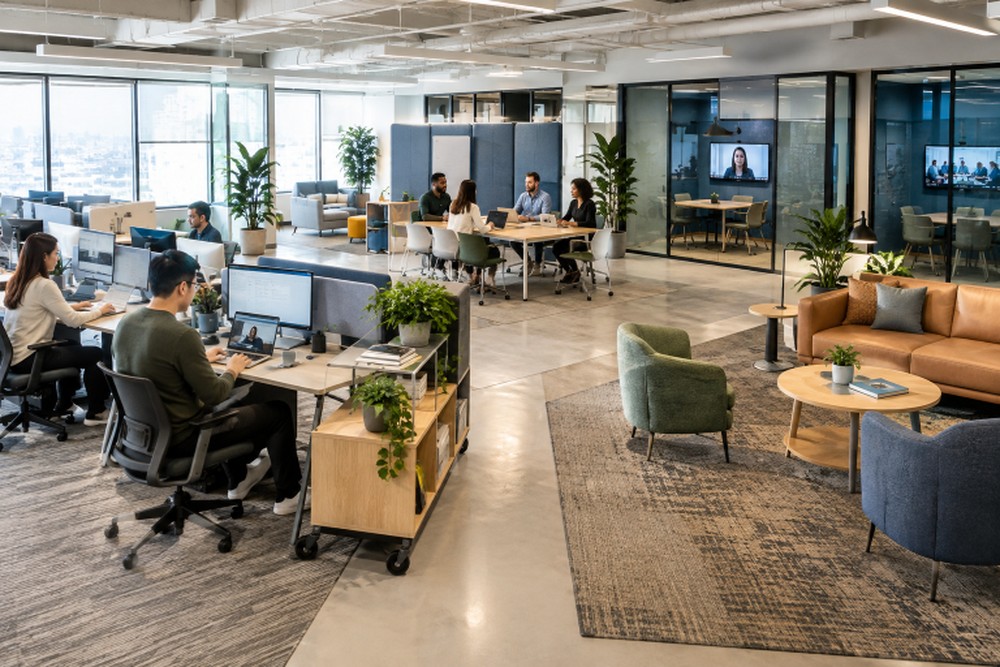
A flexible office is not simply an open room with movable desks. It is a workplace built around the ways people actually work, including concentrated individual tasks, spontaneous conversations, client meetings, project sessions, video calls, and breaks. Organizations evaluating https://www.workscapedesigns.com/commercial-office-furniture-nationwide/ can begin by matching furnishings and layouts to their daily needs rather than choosing pieces based on appearance alone.
The objective is choice with clarity. Employees should be able to find an appropriate setting for the task at hand without constantly searching for a seat, interrupting coworkers, or improvising around noise and technology issues. A well-planned office can support changing schedules and team structures while remaining comfortable and easy to use.
Why Office Flexibility Matters In 2026
A fixed desk may suit some teams, but one office must support many activities: focused writing, planning, private conversations, training, hybrid meetings, and client visits. Flexible layouts give each activity a suitable place rather than forcing one setting to serve all needs.
Flexibility shouldn’t mean disruption. Predictable options—a quiet zone for focused work and an accessible project area for collaboration—use space effectively and clarify where different tasks belong.
Start With Real Work Patterns
Start with observation, not a furniture catalog. Track daily office use, peak attendance, team collaboration, bottlenecks, meeting-room bookings, private-call locations, and areas left empty. For example, a growing firm may find assigned desks underused while meeting rooms and collaboration spaces stay full. This suggests adding shared project areas and small call rooms—not more desks.
Create Zones For Different Tasks
Flexible offices work best when they provide distinct settings with clear purposes. These zones do not always require new walls or major construction. Thoughtful placement of furniture, lighting, rugs, screens, and sound-absorbing materials can create useful boundaries.
Useful Workplace Zones
- Focus areas: Quiet locations for analysis, writing, and work that requires sustained attention.
- Team areas: Shared tables, writable surfaces, and displays for project work.
- Meeting rooms: Enclosed spaces for planned discussions, confidential conversations, and client calls.
- Touchdown spaces: Short-term places for people between meetings or visitors who need temporary access.
- Social areas: Comfortable settings for breaks and informal connection.
- Support areas: Convenient storage, printing, charging, and personal-item drop zones.
Choose Furniture That Can Change With The Team
Choose furniture that adapts as projects, departments, and headcounts change. Movable desks can be grouped for team sprints or separated for individual work; versatile tables, relocatable storage, and accessible power make reconfiguration easier. Prioritize long-term value over purchase price: durable finishes, replaceable parts, easy repairs, and compatible additions support office changes. Adjustable seating and workstations help prevent awkward postures, excessive reaching, and prolonged sitting or standing.
Support Focus Without Closing Off The Office
Open layouts can encourage visibility and conversation, but they can also expose employees to interruptions, noise, and visual distraction. The answer is not necessarily a private office for everyone. It is a balanced plan that gives people a reliable way to concentrate when their work demands it.
Simple Ways To Reduce Distractions
- Place focus spaces away from kitchens, printers, entrances, and busy walkways.
- Use acoustic panels, rugs, and other soft surfaces near active team zones.
- Add small rooms or booths for private calls and heads-down work.
- Use screens or low partitions to reduce visual distraction without blocking daylight.
- Set practical etiquette for speakerphone use, noise, shared tables, and room reservations.
Privacy should remain a choice, not a form of isolation. Employees need access to both quieter settings and spaces where working alongside others feels natural.
Plan For Hybrid Meetings And Shared Work
Effective hybrid meetings require more than a room display. Camera placement, lighting, acoustics, seating, charging, and cable management help remote participants see and contribute. Position screens for easy viewing, illuminate faces, and keep tables clear of the camera’s view.
Small rooms for two- or three-person calls are as valuable as large conference rooms, offering suitable spaces without taking up rooms for larger groups. Treat remote attendees as active participants, not afterthoughts.
Design For Growth And Space Changes
Planning for growth doesn’t mean buying every workstation upfront. Estimate staffing changes over the next two to five years, identify fast-growing teams, and reserve flexible areas that could become workstations, training space, or meeting rooms. Before major purchases, document furniture dimensions, finishes, warranties, and replacement options. Review the plan every six to twelve months to align decisions with actual usage.
Avoid Common Planning Mistakes
- Maximizing desk count: Crowding can limit circulation, comfort, and access to support spaces.
- Using one setting for every task: Collaboration and focused work need different conditions.
- Ignoring sound: Noise can undermine an otherwise attractive workplace.
- Choosing style before function: Visual appeal should reinforce, not replace, usability.
- Forgetting storage: Missing personal and team storage can quickly create clutter.
- Skipping employee feedback: Daily users often identify practical issues early.
Use A Practical Office Planning Checklist
- Review attendance, work patterns, and space usage.
- Include focus, collaboration, meeting, social, and support areas.
- Choose furniture that can move, expand, or serve more than one purpose.
- Include ergonomics, accessibility, storage, power, and cable management.
- Build sound control into the layout from the beginning.
- Test hybrid rooms from both in-person and remote perspectives.
- Budget for future hiring and changing team needs.
- Gather feedback after employees begin using the space.
Research on activity-based flexible offices suggests that varied work settings can improve opportunities for communication and collaboration, while also creating challenges when teams lack shared areas or clear coordination practices. The practical lesson is simple: provide choice, then support that choice with enough capacity, clear norms, and regular feedback.
Final Thoughts
A flexible office is defined by how well it supports real work, not by trendy furniture or a fully open floor plan. When people can focus, collaborate, meet, recharge, and adapt to changing priorities, the workplace becomes a useful business tool. Plan around daily behavior, protect concentration, and leave room for the organization to evolve without losing comfort or purpose.